
Seen enough landing pages? Switch the pitch off.

Launch a funnel without waiting for a developer.

Describe the page or paste a URL and the builder drafts it. Add the checkout and an upsell taken in one click, then publish on your domain.

Ask the agent: Which funnel step loses the most buyers?

Book a call

Three short steps, then a call or a message.

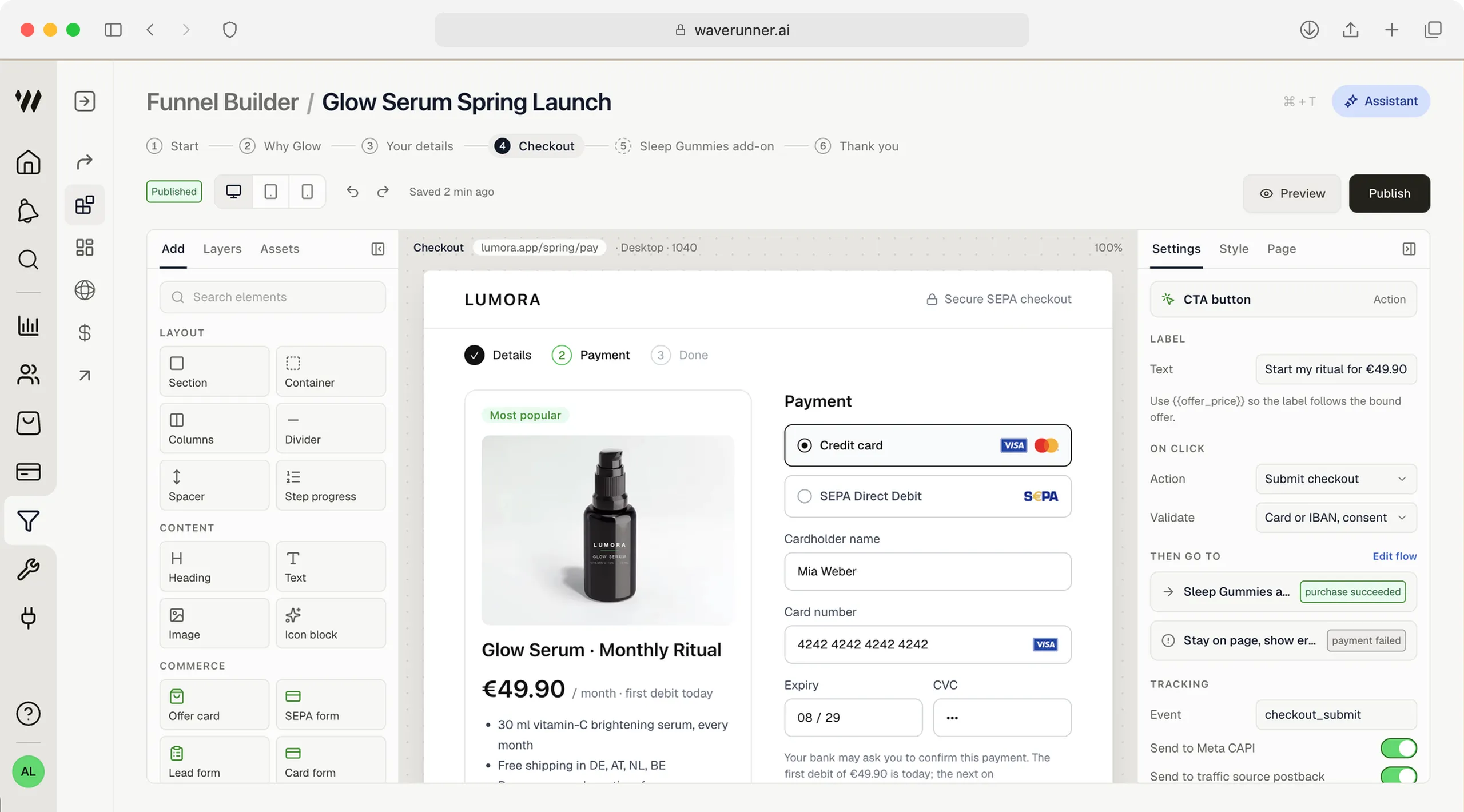
Waverunner's funnel builder on the checkout step of a six-step funnel: the step bar from the start page to an add-on and a thank-you page, the block panel, the checkout page with its payment form, and the button settings that send a successful purchase on to the add-on step

What you get

Sell from the first page to the last rebill.

Build the funnel, put the checkout on the page and let the subscription bill itself, all in one account.

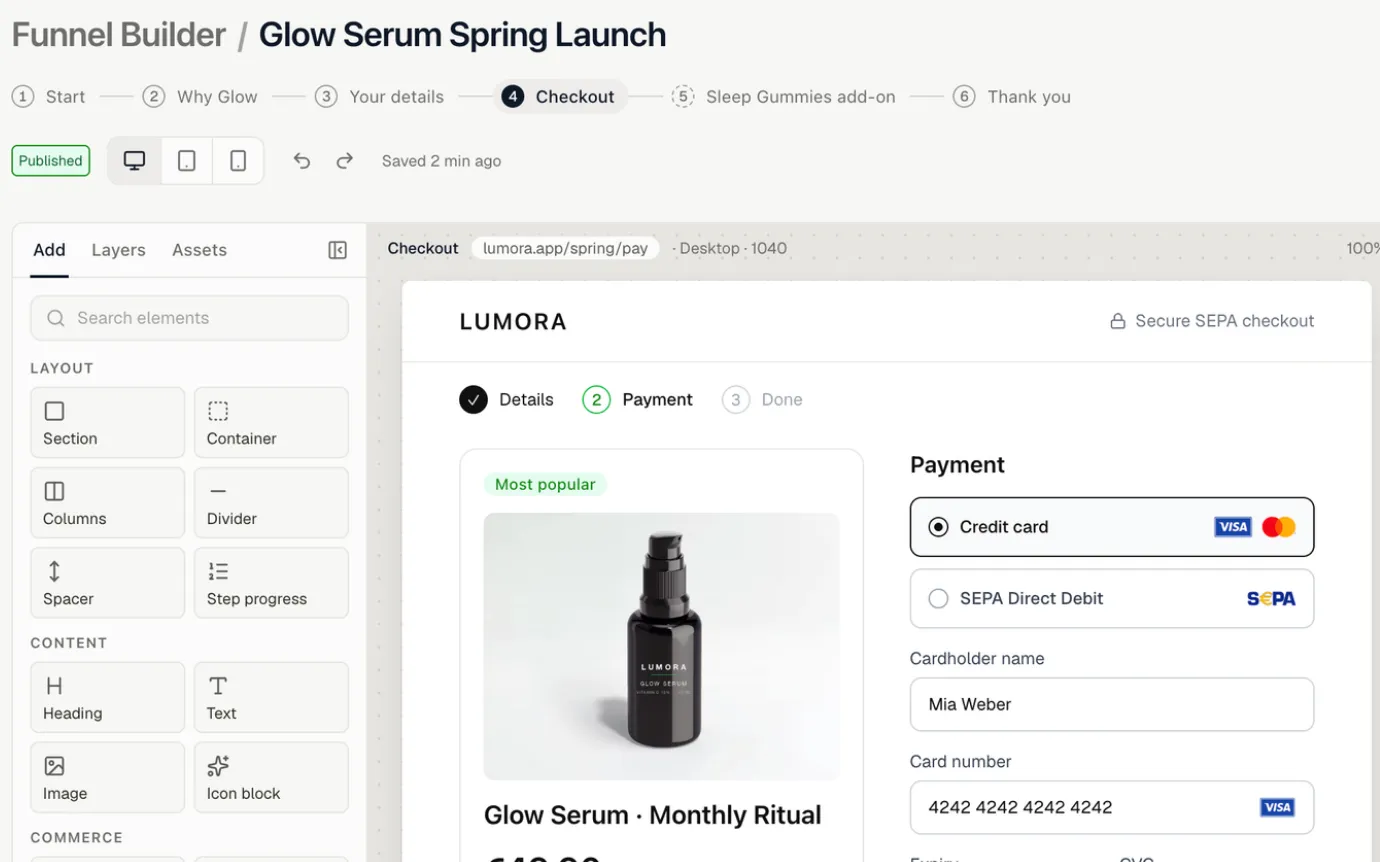
  • The funnel builder: the six steps of a funnel across the top, the panel of layout, content and commerce blocks on the left, and the checkout page being edited on the canvas

    Change any page without a developer

    Pre-landers, landing pages, checkout steps and thank-you pages, joined on one canvas. Start from a template, yours or Waverunner's, and change any block without a developer.

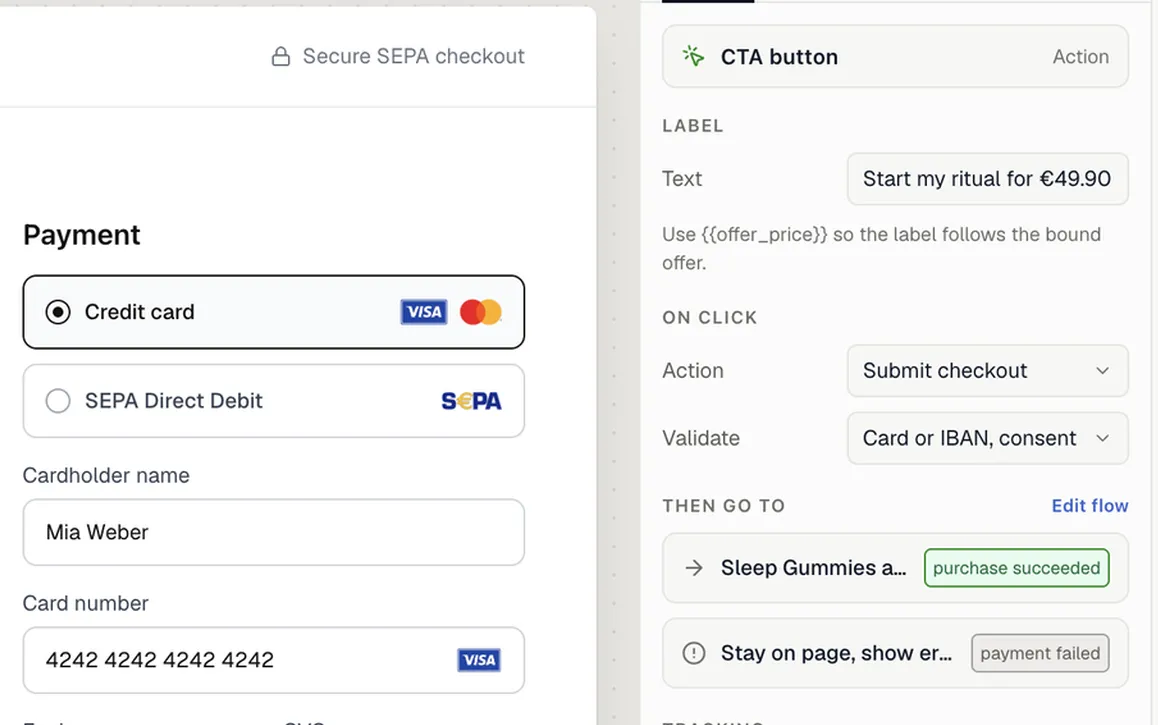
  • The checkout's pay button settings: on click it submits the checkout, then goes to the add-on step when the purchase succeeds, or stays on the page when the payment fails

    Take the payment on the page itself

    The checkout is a block on the page, not a link to another tool. After the payment the next step offers the upsell, and one click accepts it on the payment details just given.

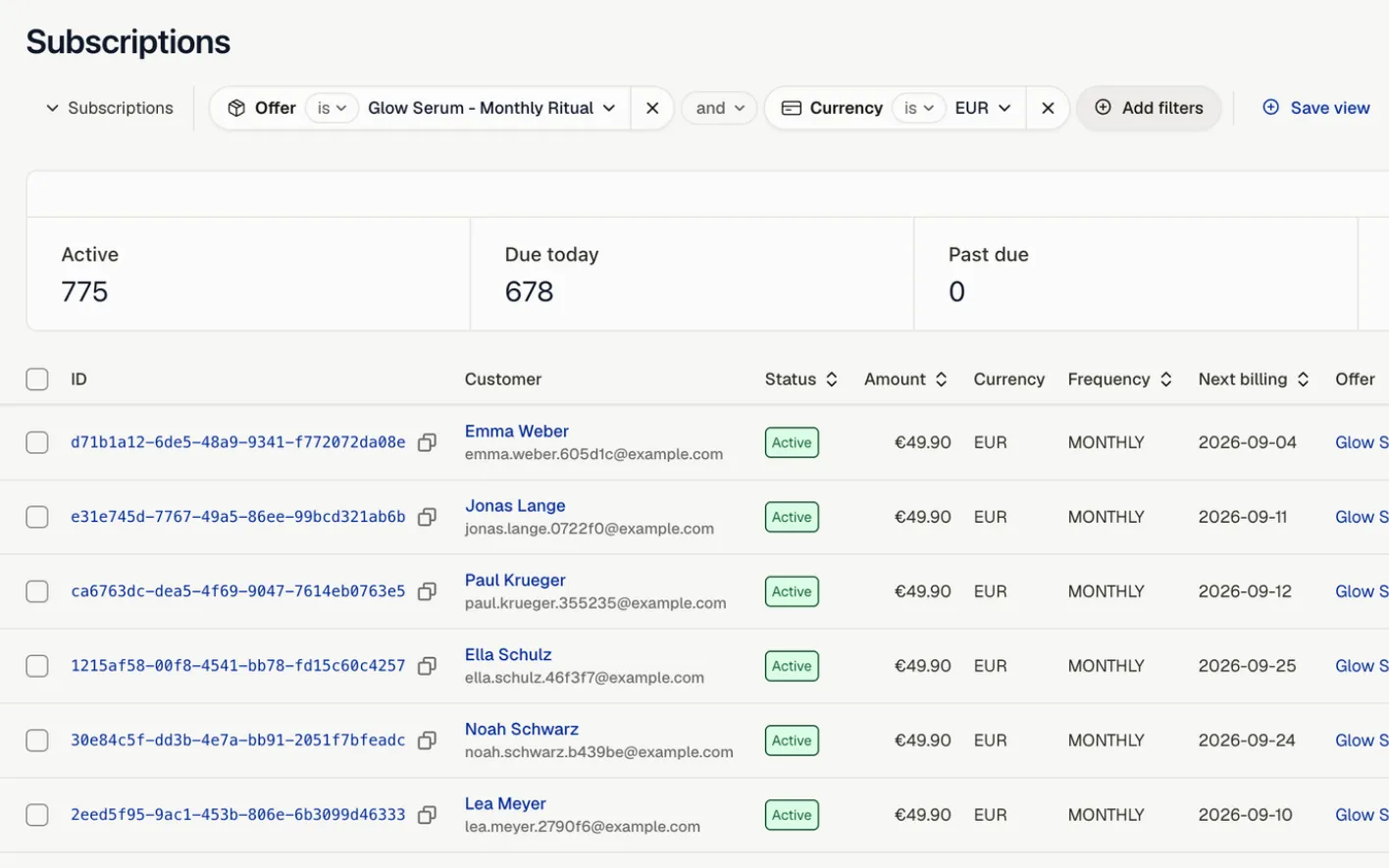
  • The subscriptions list for one monthly offer: how many are active, due today and past due, then each subscriber with status, amount, frequency and next billing date

    The subscriptions you sell bill on schedule

    The offer sets the billing, one-off, recurring or a trial then recurring, weekly to yearly. Every subscription the funnel sells is billed on schedule, each with its status and next billing date.

  • A first draft from a prompt or a URL

    Describe the page in a prompt, or give it a competitor's URL, and it drafts the page in the builder. You edit every block before it goes live.

  • Find the page that sells more

    Test one page, offer or price against another at any step of the funnel. On the Professional plan and up.

  • Live on your own domain, pixels included

    Run each funnel on your own domain, with the certificate issued for you. Add your tracking pixels and the terms and privacy pages per funnel.

AI agents

Tell it what you want. Approve what it does.

Waverunner's agents read your live funnel and billing data and act on it the way a team member would, inside the limits you set.

  1. Ask

    Funnel drop-off by source, decline rates by processor, churn by cohort, answered from the live database.

  2. Act

    Agents can pause offers, change routing, reschedule rebills, tag customers and send emails.

  3. Approve

    Every change shows the exact records it will touch and waits for your approval.

On Startup the agents answer questions; on Professional and Enterprise they also act.

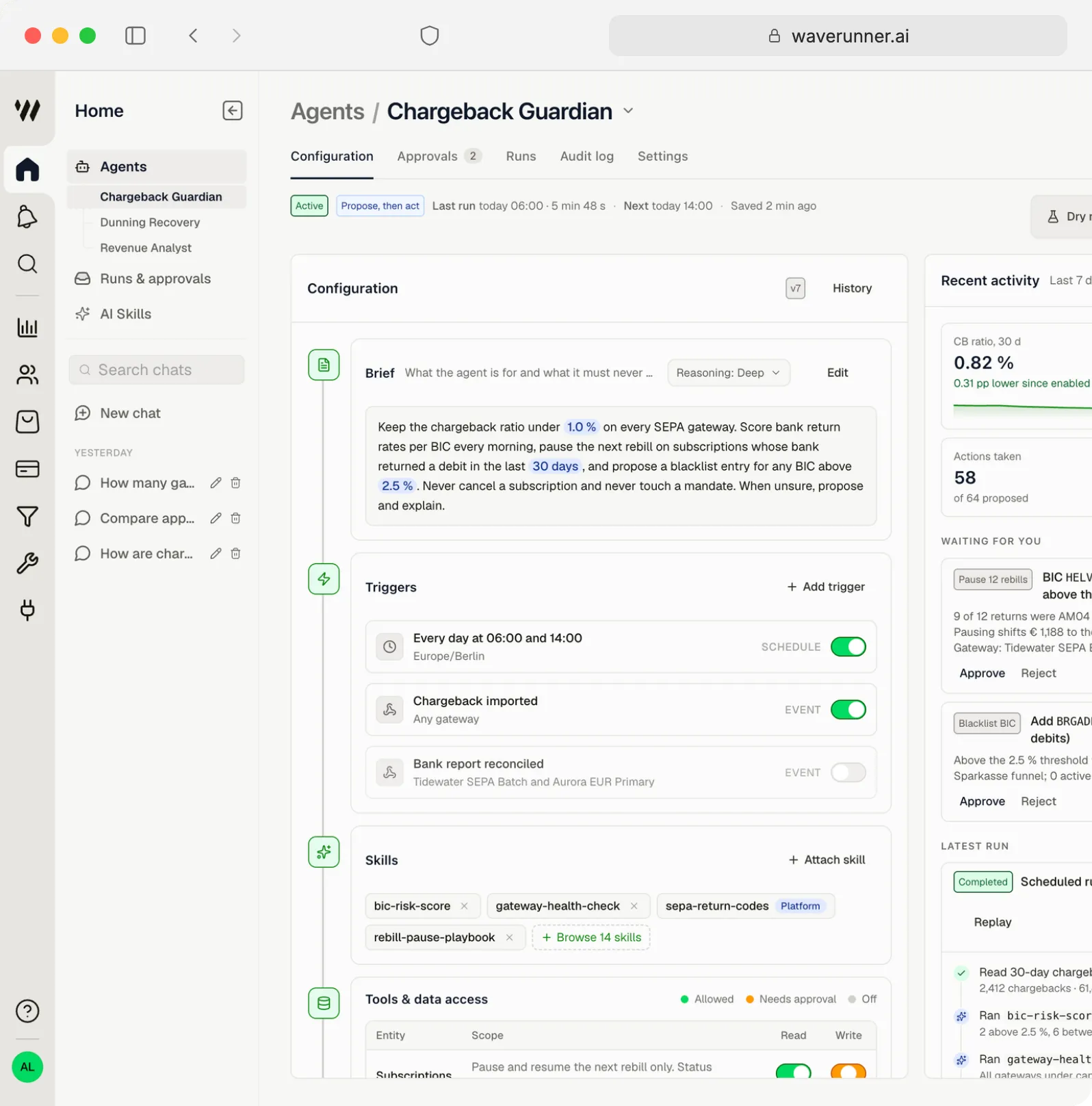
Waverunner's page for an agent called Chargeback Guardian: its brief, triggers, runs and two actions waiting for approval
Example
  1. You: Which offer on the night serum funnel converts worst?
  2. Waverunner: The €49.90 offer: 96 of 412 paid at checkout. The €39.90 offer: 140 of 380.
  3. You: Pause the €49.90 offer and email its 96 buyers about the day cream.
  4. Waverunner: Here are the offer and the 96 emails this will change. Approve?
  5. You: Approve.

How it works

From a new account to a live funnel.

Every step is set up in the dashboard. A developer is optional.

  1. Set up the product and the offer

    One product can carry several offers. Make each one-off, recurring, or a trial that turns into a subscription, and set its price and how often it bills.
  2. Draft the pages

    Start each page from a template, a written prompt or a competitor's URL. Then change the words, the images and the blocks until it is yours.
  3. Put the checkout on the page and add the upsell

    Place the checkout block where the buyer pays, then add the upsell step after it. The buyer accepts it in one click, without typing payment details again.
  4. Connect your domain, pixels and legal pages

    Point your domain at the funnel and the certificate is issued for you. Add your tracking pixels, your terms and your privacy page.
  5. Publish and send traffic

    Give each traffic source its tracking link and its postback, the message that tells the ad network a sale happened. Orders come in through the checkout, and the rebills run on schedule after them.

Why one place

Three tools, or one.

Selling a subscription from a funnel takes pages, a checkout and rebilling. Often that means three tools wired together.

Three separate tools

Wired together
The pagesBuilt in a page builder
The paymentTaken by a checkout tool the page links to or embeds
The upsellSet up in the checkout tool, then linked back to the next page
The rebillsRun by a billing tool that the checkout feeds
TrackingA pixel and a postback to set up in each tool
What you pay forThree subscriptions and three logins

Waverunner

One account
The pagesBuilt in the funnel builder
The paymentA checkout block on the page itself
The upsellA step in the same funnel, accepted in one click on the payment details just given
The rebillsBilled on schedule from the same account
TrackingPixels per funnel, tracking links and postbacks per traffic source
What you pay forOne plan, from €149 a month plus 1.5% of gross revenue
Waverunner's pricing and platform pages, November 2026. The left column describes a common setup, not a named product.

Who it is for

Built for teams that write the offer and buy the traffic.

If most of these sound like you, the call is worth thirty minutes.

  • You run paid traffic to offer pages, pre-landers and checkouts.
  • You sell one-off products, subscriptions, or a trial that turns into one.
  • You add an upsell after the payment and want it taken in one click.
  • You wait on a developer for page changes today.
  • You want the pages, the payment and the rebills in one account.

Pricing

Funnels on every plan.

A flat monthly fee plus 1.5% of gross revenue. A 14-day trial on Startup and Professional.

  • Startup

    €149a month + 1.5% of gross revenue

    • 10 funnels, 5 campaigns
    • 1 custom domain
    • No split testing
    • 2 payment gateways
    • 3 team seats
  • Professional

    €249a month + 1.5% of gross revenue

    • 25 funnels, 25 campaigns
    • 5 custom domains
    • Split testing
    • 5 payment gateways
    • 10 team seats
  • Enterprise

    Custompriced on your scale

    • Unlimited funnels and campaigns
    • Unlimited custom domains
    • Split testing
    • Unlimited gateways and seats
    • Several businesses in one workspace

A campaign holds the funnels, offers and traffic sources you run together. The 1.5% is on gross revenue in the month, rebills included, before refunds and chargebacks.

Who this is not for, and what it does not do.

Better to know now than after a call.

  • You need a page, with no checkout behind it

    A page builder on its own does that for less.

  • You sell a catalogue through a shop and a cart

    Keep your store platform. Waverunner has no Shopify or WooCommerce connector.

  • You take a few orders a month

    The fee starts at €149 a month plus 1.5% of gross revenue, which makes sense at volume, not for a handful of sales.

Questions before you build.

Do I need a developer to build a funnel?

No. Pages, checkout, upsells, offers and rebill schedules are all set up in the dashboard. If you have developers, webhooks are on every plan and the REST API is on Professional and Enterprise, and you can keep your own pages and run the checkout and subscriptions behind them.

What does the AI page builder do with a competitor's URL?

It reads the page at that address and drafts a page of yours in the builder, which you then edit block by block. You can also start from a written prompt. Swap in your own words, images and claims before you publish.

How does the one-click upsell work?

After the buyer pays, the next step of the funnel offers the upsell. One click accepts it, charged to the payment details the buyer just gave, so there is no second form to fill in. The first checkout still asks for the payment details once.

Can I sell one-off products, or only subscriptions?

Both. An offer is one-off, recurring, or a trial that turns into a subscription, billed weekly to yearly, and one product can carry several offers.

Can the funnel run on my own domain?

Yes. Point your domain at the funnel and the certificate is issued for you. Startup includes 1 custom domain, Professional 5 and Enterprise as many as you need.

What do the AI agents actually do?

They answer questions from your live data, such as which rebills failed this week. On Professional and Enterprise they can also pause offers, change routing, reschedule rebills, tag customers and send emails. Every change shows the exact records it will touch and waits for your approval. They are optional.

What happens when I book a call?

Three short steps about you, your company and your numbers; no card is asked for. If you process 50k EUR a month or more and sell through a checkout, you then pick a time for a 30 minute call with the platform team. If you process less, or run lead campaigns only, the team gets in touch with you.

Book a call with the platform team.

Thirty minutes on your funnels: your offers, your pages and what going live takes.

  • We look at the funnels you run today
  • You see your offer in the builder, agents included
  • You leave with a plan for going live
  1. 1 About you
  2. 2 Your company
  3. 3 Your numbers

Then you pick a time, or the team writes to you.

Turn it back on for the full page.

No pitch.Launch without a developer.Describe a page. Get a draft.

What it does, what it costs, who should skip it.

Waverunner builds the pages of a funnel, takes the payment, offers the upsell and bills the subscription. You describe a page; it drafts it for you to edit and publish.

What it does

  • A visual funnel builder, and AI drafts from a prompt or URL
  • A checkout with one-click upsells after the payment
  • Your own domains, tracking pixels and legal pages
  • Rebills for the subscriptions your funnel sells

Skip the pitch. Book the call.

  1. 1 About you
  2. 2 Your company
  3. 3 Your numbers

Then you pick a time, or the team writes to you.

What it costs

  • Startup

    €149a month + 1.5% of gross revenue

    10 funnels, 5 campaigns, 1 custom domain

  • Professional

    €249a month + 1.5% of gross revenue

    25 funnels, 25 campaigns, split testing

  • Enterprise

    Custom

    Unlimited funnels and campaigns

Skip it if

  • You need a page with no checkout behind it
  • You sell a catalogue through a store cart
  • You sell a handful of orders a month